Many digital audio workstations (DAWs) and audio performance tools like MainStage or Live use MIDI to allow you to bind a hardware control like button, fader, or knob to a particular software control like a volume slider or an on/off button for an effects bus.
QLab allows some use of MIDI controls, but it's limited to several specific areas and is not comprehensive. QLab has a whole audio mixer in every Audio cue, and many parameters across all cue types. The methods that other programs use to bind MIDI controllers to software parameters would be difficult to incorporate in a way that would be applicable for every use.
OSC is far more suitable for external control of QLab parameters. Through pattern matching, wildcards, and special QLab addresses such as selected and active, control can be directed precisely where it is required.
Unfortunately, although there are many ways to produce OSC messages using software with virtual faders and switches, most hardware controllers still use MIDI, not OSC. To use these controllers but still claim the benefits of OSC, third-party tools like OSCulator can accept MIDI messages and convert them to arguments in OSC messages. For example, you could configure OSCulator to translate MIDI control change 1 to a /cue/1/sliderLevel command, allowing the MIDI controller to adjust the master audio level of cue 1.
This chapter describes a method for controlling audio level sliders in Audio and Fade cues using standard MIDI control surfaces an no additional software. It begins with a simple method for controlling the master audio level slider of a selected cue using fixed-travel rotary MIDI controls. This method is then expanded upon so that the controller will pick up the QLab slider only when the controller value matches the equivalent slider level, avoiding level jumps. It then develops this technique to control the master audio level using an endless-travel encoder, and shows an example of a MIDI device controlling stems of a multitrack audio cue. It goes on to explore MIDI control of other cue parameters.
The Akai LPD8 is a simple controller, with eight fixed-travel rotary controls (i.e. knobs) and eight pads (i.e. buttons). In this video, the rotary control is configured to send control change 1 messages on MIDI channel 11. Any MIDI controller with rotary controls can be used in the same way.
Here it is in action:
A cue is played and its master audio level slider is controlled with an external MIDI controller. The Akai LPD8 is set up like this:
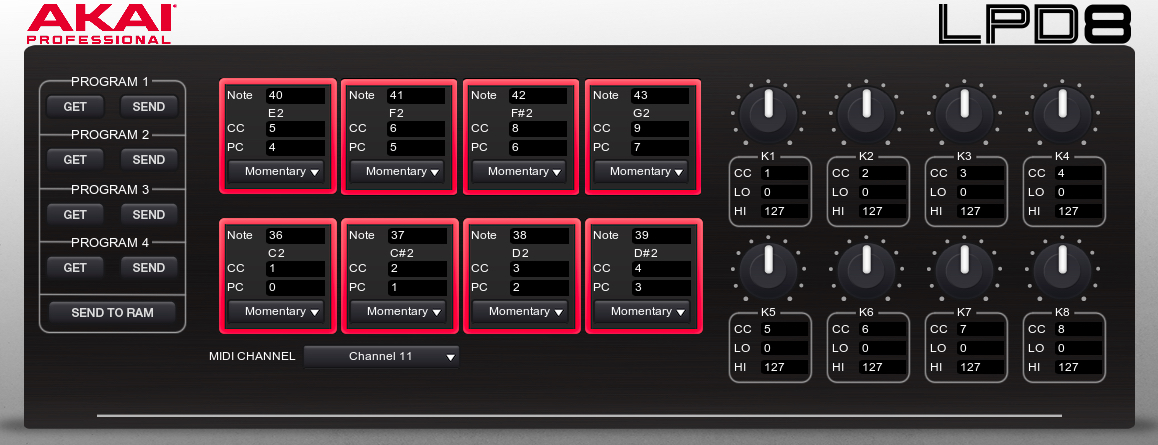
A configuration file for the Akai editor is included in the example download.
The workspace acquires MIDI data from the controller and processes it into QLab slider values by using MIDI triggers assigned to Network cues. The Network cues send OSC messages such as this one to QLab:
/cue/selected/level/0/1 -10
The knob on the MIDI controller can send 128 possible values, as defined by the MIDI specification. So, one Network cue is created for each possible controller value, with the MIDI trigger for each cue set to the corresponding value. Each Network cue outputs an OSC message setting the master audio level slider in the selected Audio cue to the equivalent level in dB.
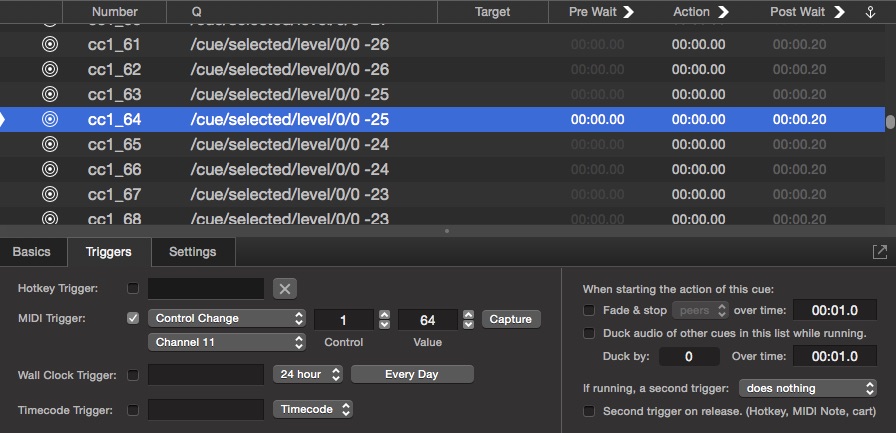
If the minimum audio level of the workspace is set to the default -60 dB and the maximum is the default 10 dB, that equates to a 70 dB range across the 128 possible MIDI controller values.
The conversion between each increment of the MIDI value to a corresponding change in dB can be calculated with this formula:
the step value = (the maximum - the minimum) / 127
In this case, a 70 dB range results in a step value of 0.551181102362, which is 70 divided by 127.
A resolution of 1 dB is adequate, so we can create a rounded value for the slider using this formula:
slider level in dB = round(minimum + ( step value * controller value))
As an example, if the knob is turn to a value of 50, we calculate the level of the slider like this:
round(-60 + 50 * 0.551181102362) = -32dB
Some other examples:
Effectively, we've created a lookup table inside QLab consisting of 128 Network cues, each responding to a single specific level from the incoming MIDI CC value and sending a single specific dB level to the selected cue in QLab. In actual table form, it might look like this:
| Cue | MIDI trigger | Outgoing OSC message |
|---|---|---|
| cc1_0 | CC 1 0 | /cue/selected/level/0/0 -60 |
| ... | ... | ... |
| cc1_64 | CC 1 64 | /cue/selected/level/0/0 -25 |
| ... | ... | ... |
| cc1_127 | CC 1 127 | /cue/selected/level/0/0 10 |
The full table would have all 128 rows; this just shows the first, middle, and last rows.
Here's a video of the Network cues in QLab, triggered by incoming MIDI CC messages. For the purposes of the video, a 0.1 second post-wait has been added to all the cues to make it easier to follow visually.
This works very well for the currently selected cue, but what happens if, for example, we set a cue's master audio level to +5 dB and then select another cue whose master audio level is currently set at -30 dB?
As soon as the knob is turned, the slider immediately jumps to the current controller level, which is undesirable, disruptive, and potentially dangerous.
What is required is a method that only allows a MIDI controller to take control of a QLab level when the incoming MIDI value precisely matches the selected cue's equivalent current level in dB.
When a cue is selected, tapping a button on the MIDI controller, in this case pad #4, triggers a Script cue in QLab. This Script cue ensures that the knob will only change the master audio level of the selected cue once it has matched the current level, avoiding any jumps.
The downloadable example workspace contains a cue list called "MIDI to OSC translate" which contains two Group cues.
The first Group cue, numbered SetS1, contains the same 128 Network cues as in the first example. These translate incoming MIDI messages to OSC messages which set the master audio level of the selected cue in QLab. These Network cues are numbered cc1_0, cc1_1, cc1_2, etc.
The second Group cue, numbered Pick, contains a second set of 128 Network cues with the same MIDI triggers as the cues in SetS1. In this Group, every Network cue sends an identical OSC message:
/cue/SetS1/armed 1
This message arms the Group cue SetS1 and therefore all of the Network cues inside that Group. These Network cues are numbered Pcc1_0, Pcc1_1, Pcc1_2, etc., and by default they are all disarmed.
When the button on the MIDI controller is pressed, it sends a Note On message (note 39 in this example) which triggers a Script cue numbered TAKE. The script in that cue is as follows:
applescriptset theminimum to -60 --minimum audio level in QLab general/settings
set themaximum to 10 --maximum audio level in QLab general/settings

-------Do not alter anything below this line-----

set thestep to (themaximum - theminimum) / 127

tell application id "com.figure53.QLab.4" to tell front workspace
    try
        --find the currently selected cue
        set theselected to last item of (selected as list) -- selected audio cue
        --Disarm all level setting and level matching cues
        set the armed of cue "Pick" to false
        set the armed of cue "SetS1" to false
        --get the current level of the master slider of the selected cue
        set thelevel to getLevel theselected row 0 column 0
        --calculate the equivalent MIDI cc controller value
        set thelevel to round ((thelevel - theminimum) / thestep)
        --convert the controller value to the required Pickup cue number
        set thecue to "Pcc1_" & (thelevel as string)
        delay 0.1
        --arm the cue
        set the armed of cue thecue to true
    end try
end tell
This script:
MIDI cc value=round ((thelevel - theminimum) / thestep)Pcc1_72When the knob on the MIDI controller is rotated, it triggers one cue in each group: a cue in Group SetS1, and a cue in Group Pick which arms Group SetS1.
When the pad is tapped, the Script cues disarms every cue in SetS1 and every cue in Pick, then re-arms the single cue in Pick which corresponds to the current master audio level of the selected cue. Until the MIDI controller sends the MIDI value corresponding to the sole armed cue, nothing happens.
In the screen shot below, the master audio level of the selected cue is -15 dB which corresponds to MIDI value 82. So, cue Pcc1_82 is the only cue that is armed.
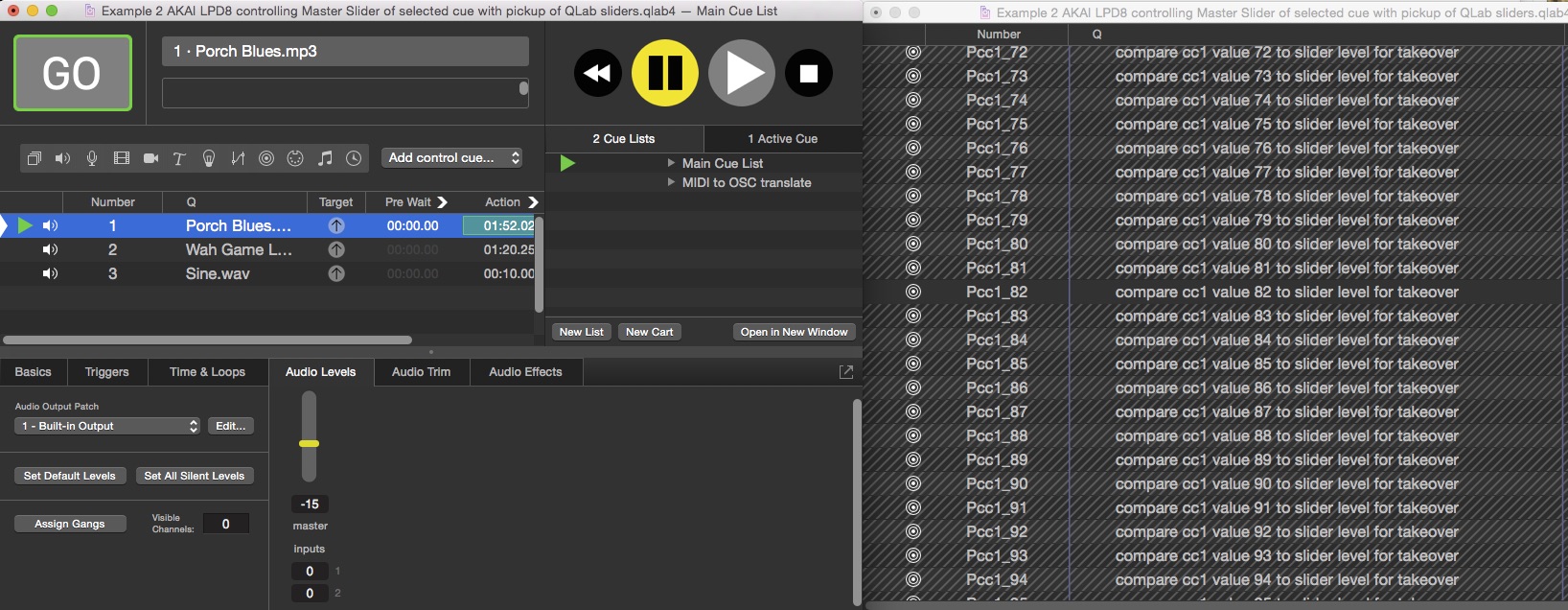
When the knob on the controller is turned to 82 that cue is triggered, rearming all the cues in Group SetS1 and allowing the MIDI controller to once again adjust levels freely.
The Behringer X-Touch Mini is an inexpensive, commonly available controller with eight endless-travel rotary encoders. This example can be easily adapted for other MIDI devices with rotary encoders, or motorized faders.
A rotary encoder is a knob with an endless track. They are usually used for level setting applications in one of two ways:
On the face of it, the simplest way of interfacing an encoder to a QLab level is to use relative mode. This would only require two cues per control, one for rising levels and one for falling, instead of the 128 cues required for the absolute method.
For example, to control the master audio level of the selected cue, you'd need one Network cue triggered by a MIDI value of 127, sent when the encoder rotates counter-clockwise, which would send this OSC message:
/cue/selected/level/0/0/- 1
This message subtracts 1 from the current level.
Then you'd need a second Network cue triggered by a MIDI value of 1, sent when the encoder rotates clockwise, which would send this OSC message:
/cue/selected/level/0/0/+ 1
This message adds 1 to the current level.
Here it is in action:
The example demonstrates a major problem with this method. Despite vigorous rotation of the encoder for eight seconds, the slider has only increased in level by 20 dB. The encoder has actually sent over 150 MIDI messages, so the slider should have traveled its full range of 70 dB in only four seconds, which is nearly eight times faster.
The Logs tab in the Workspace Status window shows that every MIDI message the controller sends is triggering the Network cue, but less than 20 percent of those triggers results in an OSC message being sent.
The reason this is happening is that QLab protects itself from being overrun by OSC data by throttling the number of identical OSC messages that it will accept in a given period of time. Because of that, this method is not ideal for this kind of control, although in the next example we will use it for fine adjustments.
With the encoder in absolute mode, it behaves essentially just like the knobs on the Akai. The entire 70 dB range can be traversed, still with 1 dB resolution, by rotating the encoder by a single full revolution. This feels much more appropriate to the current task, as long as we can solve the "pickup" issue.
Fortunately, most endless encoders have a built-in switch to signal to the receiving application that a knob has been touched. In more expensive controllers this is frequently a touch sensor built into the knob. On the Behringer, and some other low-cost controllers, this is achieved by physically depressing the knob. We can use the MIDI message generated by that switch to trigger the update.
Here it is in action:
The first Audio cue is played, and the switch on encoder 1 is depressed, triggering a Script cue in QLab to read the master audio level of the selected cue, convert that to an equivalent MIDI value, and send that value to the MIDI controller to update the position of the encoder. The LEDs around the encoder display the new level, and adjustments proceed from there. The process is repeated for the second track, and moving between the two is seamless.
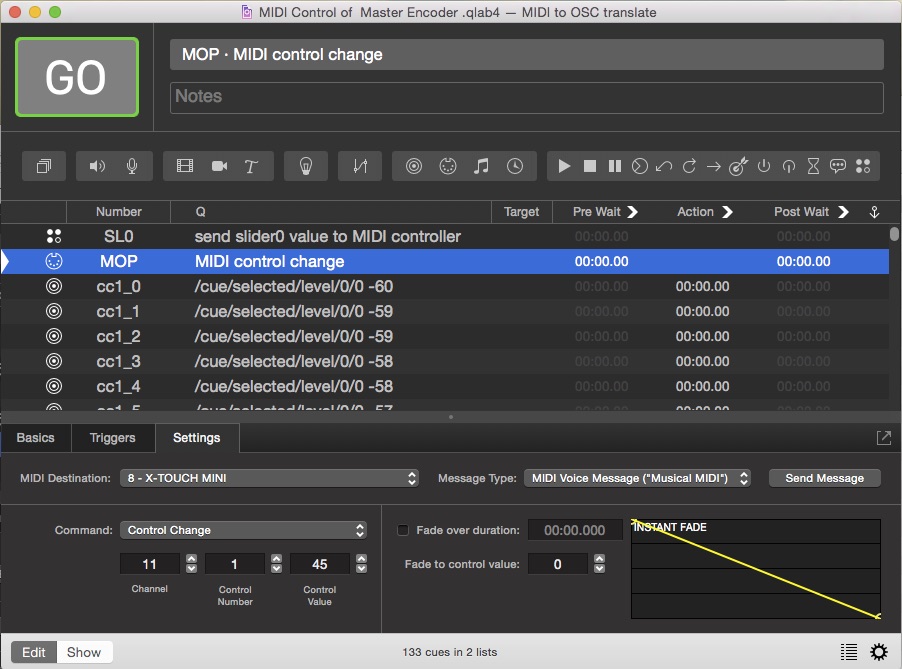
The downloadable example workspace contains a cue list called "MIDI to OSC translate" which contains 128 Network cues triggered by the 128 possible values of the encoder, just as in the previous examples. It also contains a Script cue numbered SL0 which is triggered by the MIDI message sent by clicking the encoder. Here's the script in that cue:
applescript--set MIDI patch 8 to your controller in Workspace Settings/MIDI
set theslider to 0 -- slider to control, 0 is Master
set theCC to 1 -- MIDI cc number for this slider
set theminimum to -60
set themaximum to 10
set thestep to (themaximum - theminimum) / 127
tell application id "com.figure53.QLab.4" to tell front workspace
    try
        set theselected to last item of (selected as list)
        set thelevel to getLevel theselected row 0 column theslider
        set thelevel to round ((thelevel - theminimum) / thestep)
        set byte one of cue "MOP" to theCC
        set byte two of cue "MOP" to thelevel
        start cue "MOP"
    end try
end tell
The script gets the master audio level of the currently selected cue, converts the level to a MIDI value, and then inserts that value into a MIDI cue numbered MOP which is pre-configured to send MIDI messages to the hardware controller. Finally, the script triggers MOP, thus updating the controller.
The Kore controller, which is no longer in production but readily available second hand, is a device with a very solid construction and high quality components. It has twenty switches and nine encoders, eight of which have touch-sensitive switches. When one of those knobs is touched, the Kore sends a MIDI message which can be used to trigger QLab to send the existing level of the corresponding slider. The encoders are very responsive, which means it is easy to achieve large slider travels.
While the previous examples have all focused on adjusting the master audio level only, this example will explore using the various knobs on the controller to adjust a variety of levels within the selected Audio cue or Fade cue.
QLab can be programmed to either transfer all the levels at once when any knob is touched, or to just transfer the level corresponding to that knob. Since the level indicators on this controller are fairly rudimentary, the example will focus on transferring just the levels corresponding to the knob that is touched.
The Kore has a good macOS editor, so we can configure the mapping of MIDI messages on the Kore exactly as we like:
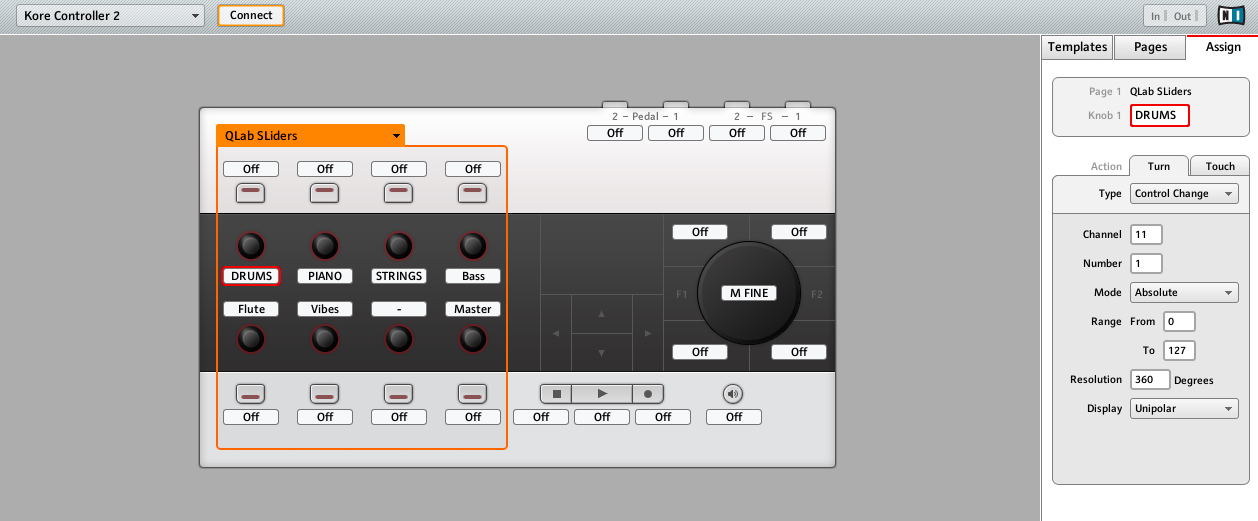
Here it is in action adjusting levels on some cues with separate stems for drums, piano, strings, bass, flute, and vibraphone. The workspace has all cue outputs routed to a stereo pair of device outputs.
There are three stereo tracks, each on a pair of ganged outputs, and three mono tracks on single outputs. These nine cue outputs are mixed down to stereo in the Device Routing tab of the audio device editor.
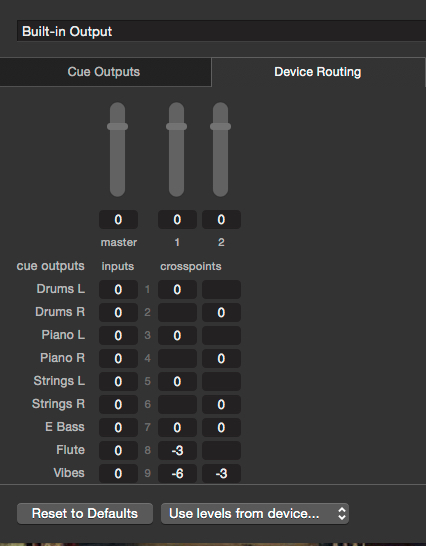
Encoder number 8, in the lower right corner of the grid of eight knobs, is configured to adjust the master audio level of the selected cue, and encoders 1 through 6 are configured to adjust the level of cue outputs 1, 3, 5, 7, 8, and 9.
Audio levels in QLab follow the controller movements very closely even though the visual interface appears to lag. The movements of on-screen sliders is particularly sluggish, but the actual levels update more or less instantly. It is best to concentrate on the level indicators on the Kore controller itself or adjust purely by ear.
As each encoder is touched, it updates the controller to match the current level of the corresponding output in QLab. Subsequent movement of the controller adjusts the level from that starting point.
Multiple levels can be adjusted simultaneously.
The workspace contains a cue list called "MIDI to OSC translate" which contains a number of cues.
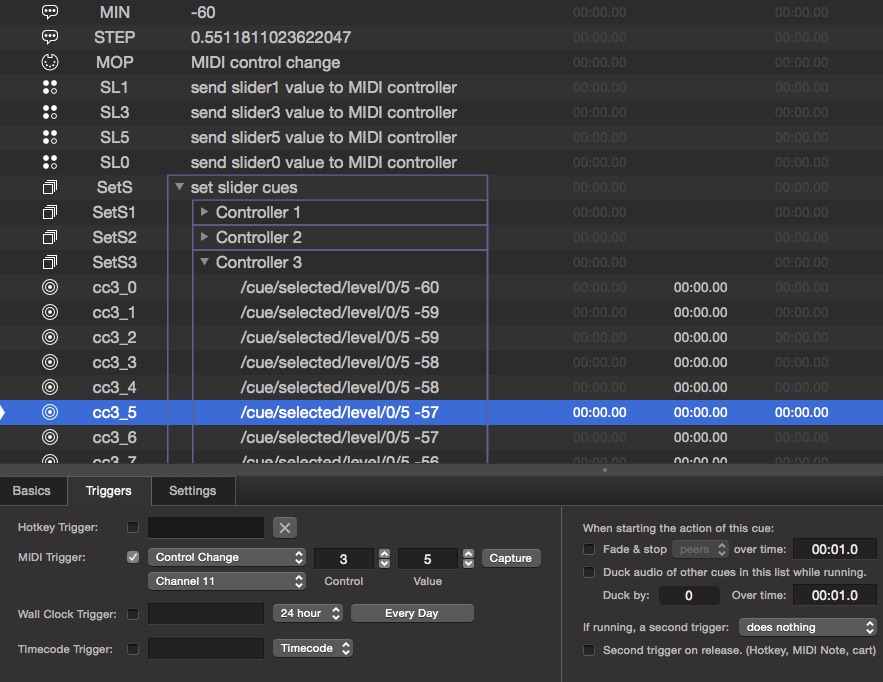
A Memo cue numbered MIN stores the minimum audio level as set in Workspace Settings → Audio in its notes field.
A Memo cue numbered STEP stores the change in dB level that corresponds to a MIDI value of 1, as discussed and calculated above.
A Midi cue numbered MOP sends MIDI messages to the Kore set the encoder levels as in the previous example.
A Group cue numbered SetS contains one Group cue and one Script cue for each knob on the Kore that we're using. Group SetS1 and Script SL1 correspond to the first knob, SetS2 and SL2 correspond to second, and so on.
The Group cues all contain 128 Network cues which operate the same way as in the previous examples.
The Script cues are each triggered when the corresponding knob is touched, and they all contain essentially the same script. The only differences are which cue output they query, and which knob they update. Here's the script for SL7:
applescriptset theslider to 7 -- slider to control, 0 is Master
set theCC to 4 -- MIDI cc number that controls slider
tell application id "com.figure53.QLab.4" to tell front workspace
    try
        set theselected to last item of (selected as list)
        set thelevel to getLevel theselected row 0 column theslider
        set thelevel to round ((thelevel - (notes of cue "MIN")) / (notes of cue "STEP"))
        set byte one of cue "MOP" to theCC
        set byte two of cue "MOP" to thelevel
        start cue "MOP"
    end try
end tell
The script gets the level of the relevant cue output, converts it to the equivalent MIDI value, sets MIDI cue MOP to send that value to the appropriate knob on the Kore, and starts the MIDI cue.
In a separate cue list called "MIDI delta", two Network cues utilize the "relative mode" approach above to use the large knob on the Kore to make single dB adjustments to the master audio level of the selected cue.
Example 4 required over 600 cues in QLab. If we expanded that example to control eight cue outputs, it would take more than 2000 cues. Building those cues could easily take hours.
In all the examples in this tutorial, however, the cues that interface with the hardware controllers have all been automatically generated from a single script in a matter of minutes.
This example explores that single script in detail. The actual mechanics of the script are fairly straightforward, but it can look quite daunting at first glance. This is because the script has the versatility to generate cue lists for any number of fixed-travel knobs or endless-travel encoders addressing any number of level controls in QLab. Since it can save days of programming, it's worth studying in detail.
Here it is in action:
One thousand cues are generated in in this example. The video has been sped up to show the process in about 45 seconds; depending on the speed of your computer, it would actually take between two and five minutes or so.
Here's the script:
applescript--CLOSE INSPECTOR BEFORE RUNNING FOR UP TO 10 TIMES SPEED INCREASE
--Script to generate utility cues, 128 cues per controller to translate MIDI cc values to OSC to set slider levels, and cues to feedback current level of sliders of selected cue in dB to MIDI controller as a cc value.
--set MIDI Patch 8 to MIDI controller device
-- set script cue template with 'run in separate process' UNCHECKED
--set Network Cue template to MIDI ch of controller in triggers
--set Script Cue template to MIDI ch of controller in triggers


--user adjustable variables

set encoders to true --(boolean) true if controller has motorized fader or is rotary encoder, false for dumb fader or knob.
set allatonce to true -- if true any encoder switch will update levels on all encoders. If false a switch will only updte it's own encoder (only used for encoders)

set theminimum to -60 --minimum audio level as set in settings/audio
set themaximum to 10 --maximum audio level as set in settings/audio
set theMIDIcc to 1 -- MIDI cc of first MIDI cc controller
set theMIDInote to 0 --MIDI note to read levels of selected cue for takeover or note sent when first MIDI encoder touched (0 for Behringer X-Touch compatibility out of box)
set theMIDIch to 11 -- Midi Channel to send feedback to encoders (only needed for encoders) (11 for Behringer X touch compatibility out of box)
set numberOfControllers to 8 -- number of consecutive controllers
set listOfSliders to {0, 1, 3, 5, 7, 8, 9, 10} -- list of sliders controlled by midi controllers. Master is 0. Number of items in list must match number of controllers.


---do not change anything below this line-----

--error check routines for variables above

if (count of items of listOfSliders) is not equal to numberOfControllers then
    display dialog "Slider list does not match number of controllers"
    return
end if

--calculate the step value

set thestep to (themaximum - theminimum) / 127 --step value for slider in dB in QLab, per increase of 1 in MIDI cc value.

--make text formatted list of sliders for use in script sources below

set formattedlist to "{"
repeat with x from 1 to numberOfControllers
    set formattedlist to formattedlist & item x of listOfSliders
    if x is not numberOfControllers then set formattedlist to formattedlist & ","
end repeat
set formattedlist to formattedlist & "}"
set thelistofsliders to formattedlist

--make text for preflight check dialog display

set thechecklist to ""
if encoders is true then
    set thechecklist to thechecklist & "GENERATING CUES FOR ENCODERS" & return & return & "MIDI ch to send to encoders is: " & theMIDIch & return & return
    if allatonce is false then
        set thechecklist to thechecklist & "An encoder's switch only updates its own encoder" & return & return
    else
        set thechecklist to thechecklist & "All encoders updated with any encoder switch" & return & return

    end if
else
    set thechecklist to thechecklist & "GENERATING CUES FOR POTS" & return & return
end if

set thechecklist to thechecklist & "Minimum audio level as set in settings audio is: " & theminimum & return & return & "Maximum audio level as set in settings audio is: " & themaximum & return & return & numberOfControllers & " controllers starting with cc" & theMIDIcc & return & "Controlling sliders: " & thelistofsliders & return & return


if encoders is false then set thechecklist to thechecklist & "MIDI note to take over levels: " & theMIDInote & return & return

-- main program

tell application id "com.figure53.QLab.4" to tell front workspace

    --check user actually wants to generate a list and present the preflight check list

    display dialog "QLab will Generate cues to convert MIDI cc messages to OSC" & return & return & "Are you sure you want to do this?" & return & return & "Delete all cues created previously by this script before running" & return & return & "Some settings cannot be managed through scripting!" & return & return & "In settings:" & return & "Set MIDI Patch 8 to MIDI controller device" & return & return & "Set script cue template with 'run in separate process' UNCHECKED" & return & return & "Set Network Cue template Triggers tab to MIDI ch of controller" & return & return & "CUE GENERATOR WILL RUN UP TO 10 TIMES FASTER IF INSPECTOR IS CLOSED" & return & return & thechecklist with icon "warning"


    --make memo cues to store variables

    --Make Memo cue to store data from preflight check list in notes field
    make type "Memo"
    set theselected to last item of (selected as list)
    set the q number of theselected to "SUM"
    set the notes of theselected to thechecklist
    set the q name of theselected to thechecklist

    --Make Memo cue to store minimum audio level for use in calculations in notes field
    make type "Memo"
    set theselected to last item of (selected as list)
    set the q number of theselected to "MIN"
    set the notes of theselected to theminimum
    set q name of theselected to theminimum

    --Make Memo cue to store step level for use in calculations, in notes field
    make type "Memo"
    set theselected to last item of (selected as list)
    set the q number of theselected to "STEP"
    set the notes of theselected to thestep
    set the q name of theselected to thestep

    --make a MIDI cue to feedback current level of a slider to MIDI controller
    make type "MIDI" --set up cue template to set patch etc.
    set theselected to last item of (selected as list)
    set the patch of theselected to 8
    set the q number of theselected to "MOP"
    set the message type of theselected to voice
    set the command of theselected to control_change
    set the channel of theselected to theMIDIch


    --Create Take cue to store current slider level and script to prepare level takeover
    if encoders is false then
        make type "Script"
        set theselected to last item of (selected as list)
        set the q number of theselected to "TAKE"
        set the q name of theselected to "Prepare level takeover"
        set the midi trigger of theselected to enabled
        set the midi command of theselected to note_on
        set the midi byte one of theselected to theMIDInote
        set the midi byte two string of theselected to ">0"
        set the script source of theselected to "set thelistofsliders to " & thelistofsliders & return & "tell application id \"com.figure53.QLab.4\" to tell front workspace" & return & "try" & return & "set theselected to last item of (selected as list)" & return & "set the armed of cue \"Pick\" to false" & return & "set the armed of cue \"SetS\" to false" & return & "repeat with aSlider from 1 to " & numberOfControllers & return & "set thelevel to getLevel theselected row 0 column (item aSlider of thelistOfSliders)" & return & "set thelevel to round ((thelevel - (notes of cue \"MIN\")) / (notes of cue \"STEP\"))" & return & "set thecue to \"Pcc\" & (aSlider as string) & \"_\" & (thelevel as string)" & return & "delay 0.1" & return & "set the armed of cue thecue to true" & return & "end repeat" & return & "end try" & return & "end tell"
    end if

    --make a group cue to enclose all the group cues relating level setting of a MIDI controller
    make type "Group"
    set theselected to last item of (selected as list)
    set the mode of theselected to fire_first_go_to_next_cue
    set the q name of theselected to "set slider cues"
    set the q number of theselected to "SetS"

    --make a group cue to enclose all the group cues relating to level matching of a current slider position to MIDI controller value for take over
    if encoders is false then
        make type "Group"
        set theselected to last item of (selected as list)
        set the mode of theselected to fire_first_go_to_next_cue
        set the q name of theselected to "Pickup level Mechanism"
        set the q number of theselected to "Pick"
    end if


    if encoders is true and allatonce is true then
        --make a script that sends all the current slider levels in use, all at once, to the MIDI controllers
        make type "SCRIPT"
        set theselected to last item of (selected as list)
        set the q name of theselected to "Feedback all levels to MIDI controller"
        set the q number of theselected to "AAO"
        set the script source of theselected to "set thesliderslist to " & thelistofsliders & return & "set numberofsliders to " & numberOfControllers & return & "set theCC to " & theMIDIcc & return & "tell application id \"com.figure53.QLab.4\" to tell front workspace" & return & "try" & return & "set theselected to last item of (selected as list)" & return & "repeat with aSlider from 1 to numberofsliders" & return & "set thelevel to getLevel theselected row 0 column (item aSlider of thesliderslist)" & return & "set thelevel to round ((thelevel - (notes of cue \"MIN\")) / (notes of cue \"STEP\"))" & return & "set byte one of cue \"MOP\" to theCC - 1 + aSlider" & return & "set byte two of cue \"MOP\" to thelevel" & return & "start cue \"MOP\"" & return & "end repeat" & return & "end try" & return & "end tell"

        --make a start cue for each encoder switch to start the group cue that feeds back all slider levels to the controller.
        repeat with astartcue from 1 to numberOfControllers
            make type "start"
            set theselected to last item of (selected as list)
            set the cue target of theselected to cue "AAO"
            set the q name of theselected to "Triggered by encoder switch MIDI note " & theMIDInote - 1 + astartcue
            set the q number of theselected to "AAO" & astartcue


            set the midi command of theselected to note_on
            set the midi byte one of theselected to theMIDInote - 1 + astartcue
            set the midi byte two string of theselected to ">0"
            set the midi trigger of theselected to enabled
        end repeat

    end if
    --

    repeat with cc from 1 to numberOfControllers
        --make a group cue for 128 cues that will control slider levels
        make type "Group"
        set theselected to last item of (selected as list)
        set the mode of theselected to fire_first_go_to_next_cue
        set the q name of theselected to "Controller " & (cc as string)
        set the q number of theselected to "SetS" & (cc as string)
        move cue id (uniqueID of theselected) of parent of theselected to end of cue "SetS"

        --make 128 cues triggered by cc values 0-127 to set slider levels via OSC and put them in the newly created group cue
        repeat with x from 0 to 127
            make type "Network"
            set theselected to last item of (selected as list)
            --set the correct triggerfor the new cue
            set the midi command of theselected to control_change
            set the midi byte one of theselected to theMIDIcc + (cc - 1)
            set the midi byte two of theselected to x
            set the midi trigger of theselected to enabled
            set the osc message type of theselected to custom
            --set the OSC message to be sent by the new cue
            set thelevel to theminimum + x * thestep
            set thelevel to round (thelevel) rounding to nearest
            set the custom message of theselected to "/cue/selected/level/0/" & item cc of listOfSliders & " " & thelevel
            set the q number of theselected to "cc" & theMIDIcc + (cc - 1) & "_" & x
            move cue id (uniqueID of theselected) of parent of theselected to end of cue ("SetS" & (cc as string))
        end repeat

        if allatonce is false then
            -- make a MIDI input script to get current value of QLab parameter and send the equivalent MIDI level to the MIDI controller)
            make type "SCRIPT"
            set theselected to last item of (selected as list)
            set the q number of theselected to "SL" & item cc of listOfSliders
            set the q name of theselected to "send slider" & (item cc of listOfSliders) & " value to MIDI controller"
            set the midi trigger of theselected to enabled
            set the midi command of theselected to note_on
            set the midi byte one of theselected to (theMIDInote + (cc - 1))
            set the midi byte two string of theselected to ">0"
            set the script source of theselected to "set theslider to " & (item cc of listOfSliders) & " -- slider to control, 0 is Master" & return & "set theCC to " & (theMIDIcc + (cc - 1)) & " -- MIDI cc number for this slider" & return & "tell application id \"com.figure53.QLab.4\" to tell front workspace" & return & "try" & return & "set theselected to last item of (selected as list)" & return & "set thelevel to getLevel theselected row 0 column theslider" & return & "set thelevel to round ((thelevel - (notes of cue \"MIN\")) / (notes of cue \"STEP\"))" & return & "set byte one of cue \"MOP\" to theCC" & return & "set byte two of cue \"MOP\" to thelevel" & return & " start cue \"MOP\"" & return & "end try" & return & "end tell"

            move cue id (uniqueID of theselected) of parent of theselected to end of cue "SetS"

        end if


        if encoders is false then
            --make 128 cues triggered by cc values 0-127 to enable a group of 128 level setting cues when the encoder level matches the slider level and move to the group numbered Pick
            repeat with x from 0 to 127
                make type "network"
                set theselected to last item of (selected as list)
                --set the correct triggerfor the new cue
                set the midi command of theselected to control_change
                set the midi byte one of theselected to theMIDIcc + (cc - 1)
                set the midi byte two of theselected to x
                set the midi trigger of theselected to enabled
                set the osc message type of theselected to custom
                --set the OSC for the newcue
                set the custom message of theselected to "/cue/SetS" & (theMIDIcc + (cc - 1)) & "/armed 1"
                set the q number of theselected to "Pcc" & theMIDIcc + (cc - 1) & "_" & x
                set q name of theselected to "compare cc" & theMIDIcc + (cc - 1) & " value " & x & " to slider level for takeover"
                move cue id (uniqueID of theselected) of parent of theselected to end of cue "Pick"
            end repeat
        end if
    end repeat

    --disarm all level setting groups and cues
    if encoders is false then set the armed of cue "SetS" to false

    --disarm this generator script to guard against accidental operation
    set the armed of cue "GEN" to false

end tell
The top of the script has some variables to let you configure the cue list that will be automatically generated.
For the purposes of this example, the variables are set to build a cue list that controls the selected audio cue using a Behringer X-Touch Mini.
Audio cues in the demo workspace are routed like this:
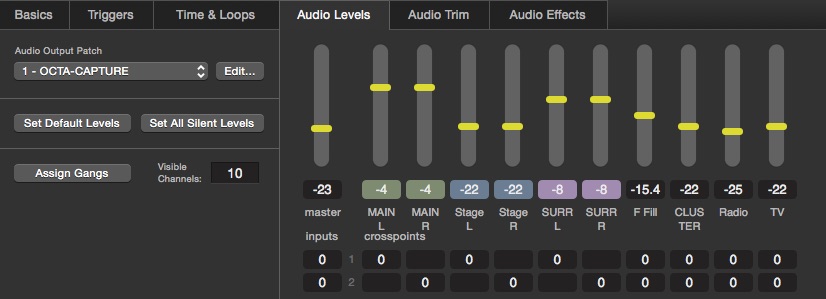
There are three ganged pairs of cue outputs followed by four mono cue outputs. We can control all the outputs by setting the levels of outputs 0 (for master), 1, 3, 5, 7, 8, 9, and 10.
Certain workspace settings can't be adjusted via scripting, so the following need to be set manually. (You can build a template workspace with these included.)
First, in Workspace Settings → Audio, set the volume limits to +10 dB maximum and -60 dB minimum:
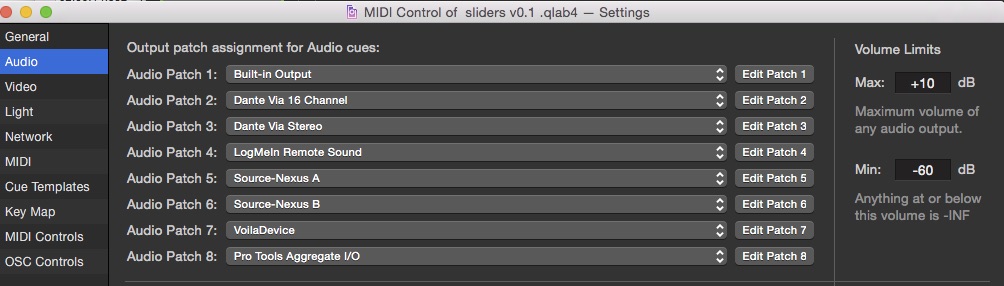
Next, in Workspace Settings → MIDI, assign MIDI Patch 8 to the hardware controller, in this case the X-Touch Mini:
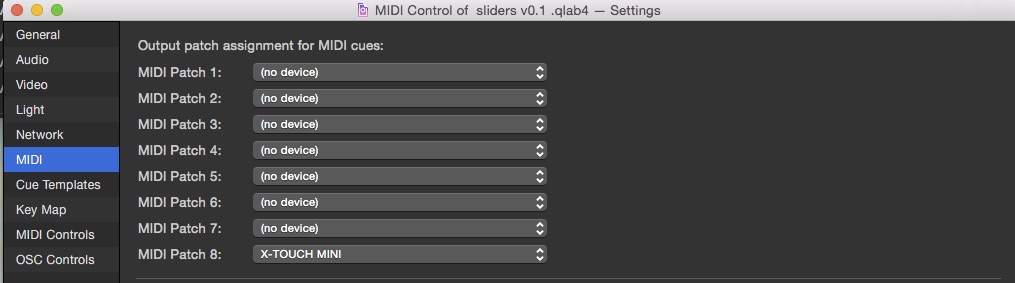
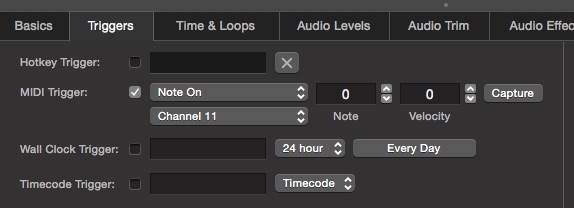
Next, in Workspace Settings → Cue Templates, for both Audio cues and Network cues, set the Triggers tab to use a MIDI trigger on MIDI channel 11:
Last, still in Cue Templates, set the Script cue template to not run scripts in a separate process:

When the script is run, the following actions are automated:
step = (the maximum audio level - the minimum audio level ) / 127. This calculates the level change in dB for each MIDI value change of 1. The 70 dB range of the workspace divided by the 128(-1) possible values of a 7-bit MIDI controller gives a change of .5518 dB per controller increment.For the variables in the example script the checklist looks like this:
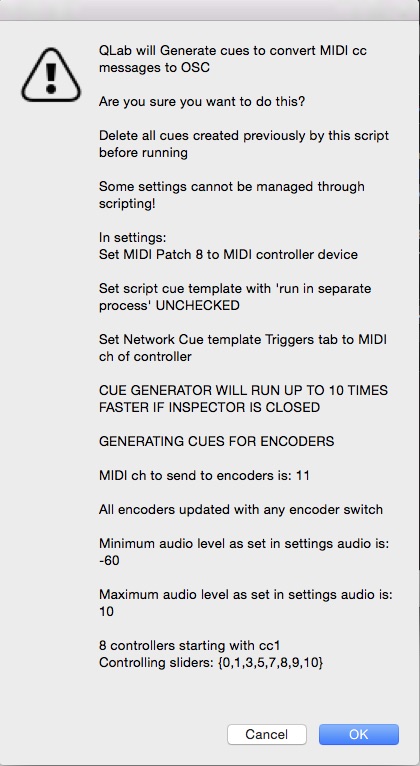
When OK is pressed the cue list is generated as seen below. For the purpose of illustrating this example:
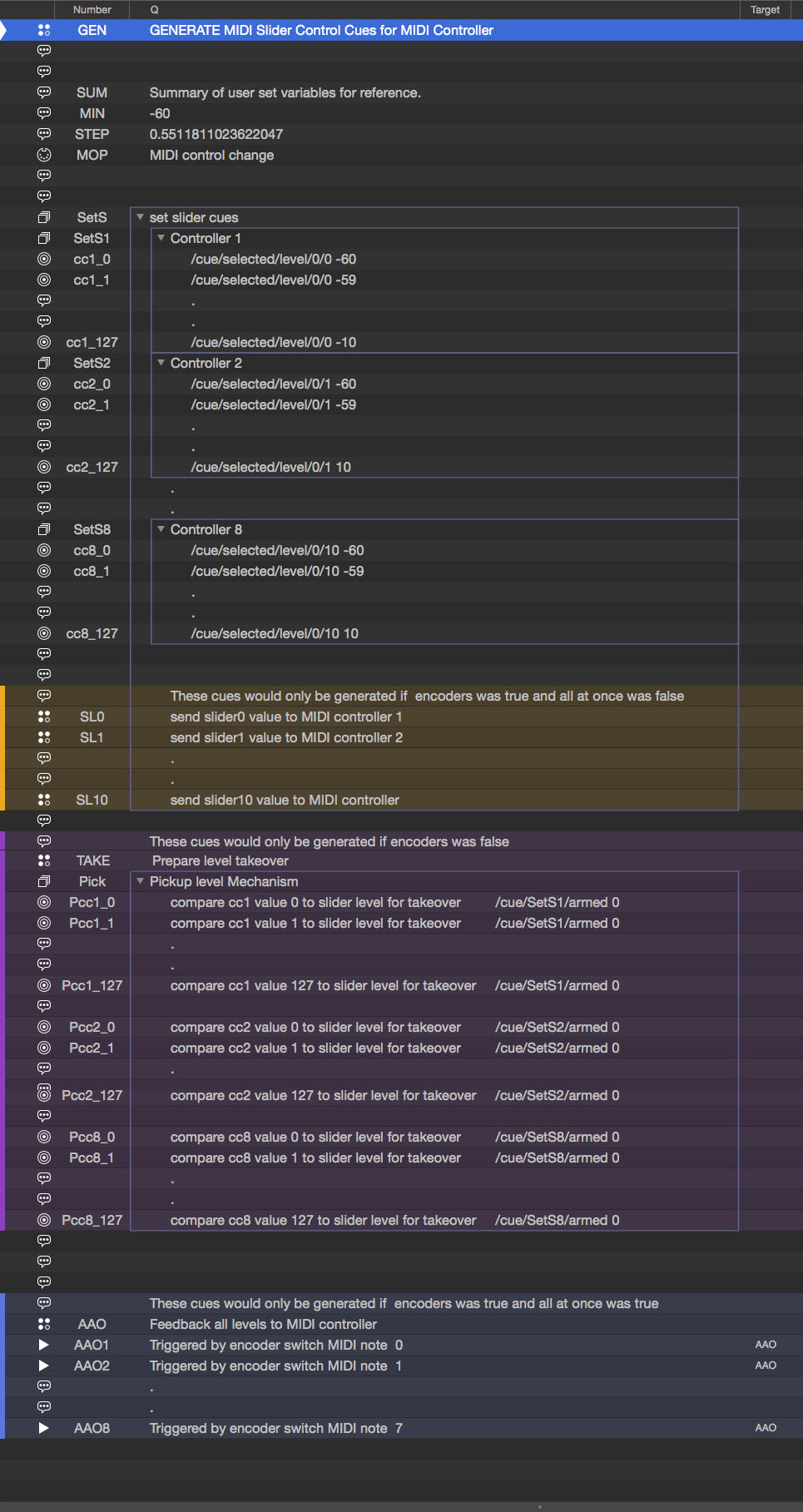
Memo cues are created which store values in their notes fields. The three Memo cues store a summary of the user-set variables, the minimum audio level and the step value. These are used in calculations throughout the script.
A MIDI cue is created, numbered MOP, which will send MIDI messages to the hardware controller when directed to by other parts of the script.
If a controller with fixed-travel knobs were being used, a Script cue would be created, numbered TAKE, to get all the current cue output levels of the selected cue, and arm only the appropriate cues in a Group numbered Pick, as we saw in example 1. These are the purple cues in the screen shot. The script looks like this:
applescriptset thelistofsliders to {0, 1, 3}
tell application id "com.figure53.QLab.4" to tell front workspace
    try
        set theselected to last item of (selected as list)
        set the armed of cue "Pick" to false
        set the armed of cue "SetS" to false
        repeat with aSlider from 1 to 3
            set thelevel to getLevel theselected row 0 column (item aSlider of thelistofsliders)
            set thelevel to round ((thelevel - (notes of cue "MIN")) / (notes of cue "STEP"))
            set thecue to "Pcc" & (aSlider as string) & "_" & (thelevel as string)
            delay 0.1
            set the armed of cue thecue to true
        end repeat
    end try
end tell
A Group cue is created, numbered SetS, which contains a Group cue containing 128 Network cues for each knob on the controller. These Network cues will set the level of cue outputs in the selected cue using OSC.
If a controller with fixed-travel knobs were being used, a Group cue would be created, numbered Pick, which would contain a Group of 128 Network cues for each knob on the controller. This would allow cues in Group SetS to be armed when the matching encoder levels are received. These are the purple cues in the screen shot.
A script cue is created numbered AAO which will send all the audio levels to the corresponding knob on the controller using this script:
applescriptset thesliderslist to {0, 1, 3, 5, 7, 8, 9, 10}
set numberofsliders to 8
set theCC to 1
tell application id "com.figure53.QLab.4" to tell front workspace
    try
        set theselected to last item of (selected as list)
        repeat with aSlider from 1 to numberofsliders
            set thelevel to getLevel theselected row 0 column (item aSlider of thesliderslist)
            set thelevel to round ((thelevel - (notes of cue "MIN")) / (notes of cue "STEP"))
            set byte one of cue "MOP" to theCC - 1 + aSlider
            set byte two of cue "MOP" to thelevel
            start cue "MOP"
        end repeat
    end try
end tell
Here's that script in action:
Each time a cue is selected and any encoder switch is pressed, all the audio levels for the selected cue are translated to their equivalent MIDI values, and those values are sent to the hardware controller to indicate that value, and cause changes in level to begin immediately from that point.
One Start cue is created for each switch on the hardware controller to start Script cue AAO.
There are then some nested repeating loops.
The cc loop creates cues for each knob, e.g. cues SetS1 to SetS8.
The x loop is nested within the cc loop, and creates 128 cues, one for each MIDI value, e.g. cues cc1_0 to cc1_127.
If the "all at once" user variable was set to false at the top of the script, a Script cue is created for each knob being used. The Script cues are numbered e.g. SL1. These scripts use the MIDI MOP cue to set individual levels when individual knob switches are pressed. These are the orange cues in the screen shot. Here's the script:
applescriptset theslider to 10 -- slider to control, 0 is Master
set theCC to 8 -- MIDI cc number for this slider
tell application id "com.figure53.QLab.4" to tell front workspace
    try
        set theselected to last item of (selected as list)
        set thelevel to getLevel theselected row 0 column theslider
        set thelevel to round ((thelevel - (notes of cue "MIN")) / (notes of cue "STEP"))
        set byte one of cue "MOP" to theCC
        set byte two of cue "MOP" to thelevel
        start cue "MOP"
    end try
end tell
The last thing the generator script does is disarm itself so that it cannot not be triggered accidentally.
Now that we have level controls well in hand, the generator script can be modified to enable MIDI control of other QLab parameters.
The usefulness of this is probably going to be restricted to parameters that can be meaningfully controlled with a range of 128 values. For example, if you are using an HD video projector for video output, a 128-step MIDI controller is a poor option for controlling translation, since the X-axis is 1,920 pixels and the Y-axis is 1080 pixels. Each "click" of the knob would relate to at least 8 pixels, which is likely to be insufficient.
Large ranges could be controlled with 14-bit MIDI controllers, such as the pitch bend control. But it would be unwieldy to do this entirely within QLab, and some external program would be needed to do the translation.
For this example, we'll use a MIDI knob to adust the playback rate of an Audio cue.
Here it is in action with endless-travel encoders:
The current rate is requested by the controller when the encoder is touched, and rate adjustment can take place immediately starting at that value.
Here it is in action with fixed-travel knobs:
As with the audio level examples, the fixed-travel knob picks up the current playback rate when it passes the equivalent MIDI value.
The combination of MIDI triggering and OSC control again gives a very responsive performance.
The script for generating the cues to control playback rate is easily adapted for other parameters and different types of MIDI controller.
applescript--Script to generate cues to convert MIDI cc messages to OSC to control audio cue sliders
--Delete all cues created previously by this script before running
--Some settings cannot be managed through scripting!
--In settings:
--Set MIDI Patch 8 to MIDI controller device
--Set script cue template with 'run in separate process' UNCHECKED
--Set Network Cue template Triggers tab to MIDI ch of controller
--CUE GENERATOR WILL RUN UP TO 10 TIMES FASTER IF INSPECTOR IS CLOSED

--set parameters for cue list generation here.

set thedescription to "Change Rate of the selected cue" -- description of control you want to generate
set encoders to false --(boolean) true if controller has motorized fader or is rotary encoder, false for standard fixed travel fader or knob.
set theminimum to 0.25 --minimum rate
set themaximum to 3 --maximum audio level as set in settings audio
set thestep to (themaximum - theminimum) / 127 --step value for slider in dB in QLab per increase of 1 in MIDI cc value.
set theMIDIcc to 1 -- MIDI cc of MIDI cc controller for this parameter
set theMIDInote to 43 --MIDI note to read levels of selected cue for takeover or note sent when first MIDI encoder touched (0 for Behringer X touch compatibility out of box)
set theMIDIch to 11 -- Midi Channel to send feedback to encoders (only needed for encoders) (11 for Behringer X touch compatibility out of box)
set theOSCaddress to "/cue/selected/rate" -- string containing OSC address
set appleScriptEquivalent to "rate" --string containing the equivalent property name for that address

---Do not change anything below this line-------------

set allatonce to false

--generate text for preflight check list dialog display
set thechecklist to ""
if encoders is true then
    set thechecklist to thechecklist & "GENERATING CUES FOR ENCODERS" & return & return & "MIDI ch to send to encoders is: " & theMIDIch & return & return
else
    set thechecklist to thechecklist & "GENERATING CUES FOR POTS" & return & return
end if

set thechecklist to thechecklist & thedescription & " from: " & theminimum & " to: " & themaximum & return & return & "Controller: " & theMIDIcc & return

if encoders is false then set thechecklist to thechecklist & "MIDI note to take over levels: " & theMIDInote & return & return


tell application id "com.figure53.QLab.4" to tell front workspace

    --check user actually wants to generate a list and show preflight check list

    display dialog "QLab will Generate cues to convert MIDI cc messages to OSC" & return & return & "Are you sure you want to do this?" & return & return & "Delete all cues for this controller created previously by this script before running" & return & return & "Some settings cannot be managed through scripting!" & return & return & "In settings:" & return & "Set MIDI Patch 8 to MIDI controller device" & return & return & "Set script cue template with 'run in separate process' UNCHECKED" & return & return & "Set Network Cue template Triggers tab to MIDI ch of controller" & return & return & "CUE GENERATOR WILL RUN UP TO 10 TIMES FASTER IF INSPECTOR IS CLOSED" & return & return & thechecklist with icon "warning"

    --make memo cues to store variables

    -- create a memo cue to store a summary of the cuelist that is generated, in its notes field)
    make type "Memo"
    set theselected to last item of (selected as list)
    set the q number of theselected to "SUM"
    set the notes of theselected to thechecklist
    set the q name of theselected to thechecklist

    -- make a memo cue to store a variable, minimum level
    make type "Memo"
    set theselected to last item of (selected as list)
    set the q number of theselected to "MIN"
    set the notes of theselected to theminimum

    -- make a memo cue to store a variable, step per cc value

    make type "Memo"
    set theselected to last item of (selected as list)
    set the q number of theselected to "STEP"
    set the notes of theselected to thestep

    --make a MIDI cue to feedback current parameter setting to MIDI controller. MIDI Patch 8 must be set in settings/MIDI to the MIDI controller device in use.
    make type "MIDI" --set up cue to set patch etc.
    set theselected to last item of (selected as list)
    set the patch of theselected to 8
    set the q number of theselected to "MOP"
    set the message type of theselected to voice
    set the command of theselected to control_change
    set the channel of theselected to theMIDIch


    --Create a Script cue numbered TAKE to prepare level takeover (only used for standard pots, not encoders)
    if encoders is false then
        make type "Script" --arm pickup cues for level takeover
        set theselected to last item of (selected as list)
        set the q number of theselected to "TAKE"
        set the q name of theselected to "Prepare level takeover"
        set the midi trigger of theselected to enabled
        set the midi command of theselected to note_on
        set the midi byte one of theselected to theMIDInote
        set the midi byte two string of theselected to ">0"
        set the script source of theselected to "tell application id \"com.figure53.QLab.4\" to tell front workspace" & return & "try" & return & "set theselected to last item of (selected as list)" & return & "set the armed of cue \"Pick\" to false" & return & "set the armed of cue \"SetS\" to false" & return & "set thevalue to round (((" & appleScriptEquivalent & " of theselected) - (" & notes of cue "MIN" & ")) / (" & notes of cue "STEP" & "))" & return & "set thecue to \"Pcc" & theMIDIcc & "_\" & (thevalue as string)" & return & "delay 0.1" & return & "set the armed of cue thecue to true" & return & "end try" & return & "end tell"
    end if

    --make a group cue
    make type "Group"
    set theselected to last item of (selected as list)
    set the mode of theselected to fire_first_go_to_next_cue
    set the q name of theselected to "set slider cues"
    set the q number of theselected to "SetS"

    --make a group cue
    if encoders is false then
        make type "Group"
        set theselected to last item of (selected as list)
        set the mode of theselected to fire_first_go_to_next_cue
        set the q name of theselected to "Pickup level Mechanism"
        set the q number of theselected to "Pick"
    end if


    --make a group cue
    make type "Group"
    set theselected to last item of (selected as list)
    set the mode of theselected to fire_first_go_to_next_cue
    set the q name of theselected to "Controller " & (theMIDIcc as string)
    set the q number of theselected to "SetS" & theMIDIcc as string
    move cue id (uniqueID of theselected) of parent of theselected to end of cue "SetS"

    --make 128 cues triggered by cc values 0-127 to set parameter via OSC
    repeat with x from 0 to 127
        make type "Network"
        set theselected to last item of (selected as list)
        --set the correct triggerfor the new cue
        set the midi command of theselected to control_change
        set the midi byte one of theselected to theMIDIcc
        set the midi byte two of theselected to x
        set the midi trigger of theselected to enabled
        set the osc message type of theselected to custom
        --set the OSC message to be sent by the new cue
        set thelevel to theminimum + x * thestep
        set the custom message of theselected to theOSCaddress & " " & thelevel
        set the q number of theselected to "cc" & theMIDIcc & "_" & x
        move cue id (uniqueID of theselected) of parent of theselected to end of cue ("SetS" & theMIDIcc)
    end repeat


    -- make a MIDI input script to get current value of QLab parameter and send the equivalent MIDI level to the MIDI controller
    make type "SCRIPT"
    set theselected to last item of (selected as list)
    set the q number of theselected to "P_" & appleScriptEquivalent
    set the q name of theselected to "send " & appleScriptEquivalent & " value to MIDI controller"
    set the midi trigger of theselected to enabled
    set the midi command of theselected to note_on
    set the midi byte one of theselected to theMIDInote
    set the midi byte two string of theselected to ">0"
    set the script source of theselected to "set theCC to " & (theMIDIcc) & " -- MIDI cc number for this slider" & return & "tell application id \"com.figure53.QLab.4\" to tell front workspace" & return & "try" & return & "set theselected to last item of (selected as list)" & return & "set thevalue to " & appleScriptEquivalent & " of theselected" & return & "set byte one of cue \"MOP\" to theCC" & return & "set byte two of cue \"MOP\" to thevalue" & return & " start cue \"MOP\"" & return & "end try" & return & "end tell"

    move cue id (uniqueID of theselected) of parent of theselected to end of cue "SetS"


    if encoders is false then

        --make 128 cues triggered by cc values 0-127 to set slider levels via OSC
        repeat with x from 0 to 127
            make type "network"
            set theselected to last item of (selected as list)
            --set the correct trigger for the new cue
            set the midi command of theselected to control_change
            set the midi byte one of theselected to theMIDIcc
            set the midi byte two of theselected to x
            set the midi trigger of theselected to enabled
            set the osc message type of theselected to custom
            --set the OSC for the newcue
            set the custom message of theselected to "/cue/SetS" & (theMIDIcc) & "/armed 1"
            set the q number of theselected to "Pcc" & theMIDIcc & "_" & x
            set q name of theselected to "compare cc" & theMIDIcc & " value " & x & " to slider level for takeover"
            move cue id (uniqueID of theselected) of parent of theselected to end of cue "Pick"
        end repeat
    end if

    if encoders is false then set the armed of cue "SetS" to false
    set the armed of cue "GEN" to false
end tell
The script works almost identically to the script for generating audio level controls in example 5. It is slightly simpler since we are only dealing with one knob controlling one parameter.
The settings in this script are set up for conventional rotary controls.
applescriptset thedescription to "Change Rate of the selected cue" -- description of control you want to generate
set encoders to false --(boolean) true if controller has motorized fader or is rotary encoder, false for standard fixed travel fader or knob.
set theminimum to 0.25 --minimum rate
set themaximum to 3 --maximum audio level as set in settings audio
set thestep to (themaximum - theminimum) / 127 --step value for slider in dB in QLab per increase of 1 in MIDI cc value.
set theMIDIcc to 1 -- MIDI cc of MIDI cc controller for this parameter
set theMIDInote to 43 --MIDI note to read levels of selected cue for takeover or note sent when first MIDI encoder touched (0 for Behringer X touch compatibility out of box)
set theMIDIch to 11 -- Midi Channel to send feedback to encoders (only needed for encoders) (11 for Behringer X touch compatibility out of box)
set theOSCaddress to "/cue/selected/rate" -- string containing OSC address
set appleScriptEquivalent to "rate" --string containing the equivalent property name for that address
The minimum and maximum variables are arbitrary values specifying the knob's range, and there are two more variables which are set according to what is being controlled. These are for the OSC address and its AppleScript equivalent, which is used when calculating the equivalent MIDI value for a current QLab parameter value.
The preflight check list for the above settings looks like this:
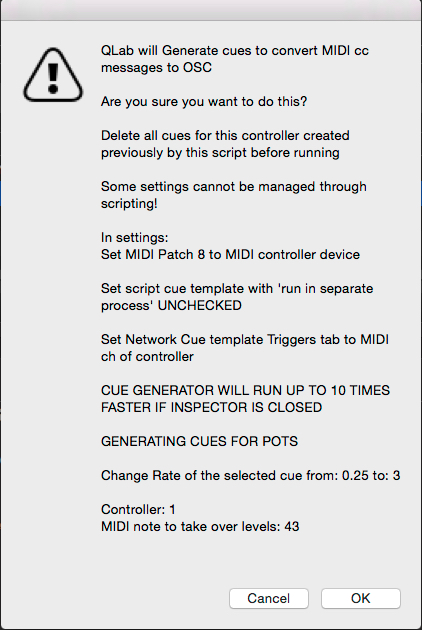
Thereafter, the cues generated are almost identical to those generated by the script in example 5.
Music used in this chapter:
"Porch Blues" Kevin MacLeod
"Wah Game Loop" Kevin MacLeod
(incompetech.com)
Licensed under Creative Commons: By Attribution 4.0 License

Scarborough Fair stems
Arranged and performed by Mic Pool based on original MIDI files by Mick Jones (public domain)
