This chapter details a workspace that will be most useful for rehearsing dances and other performances where it is helpful to jump to named cue points in music recordings repeatedly and rapidly.
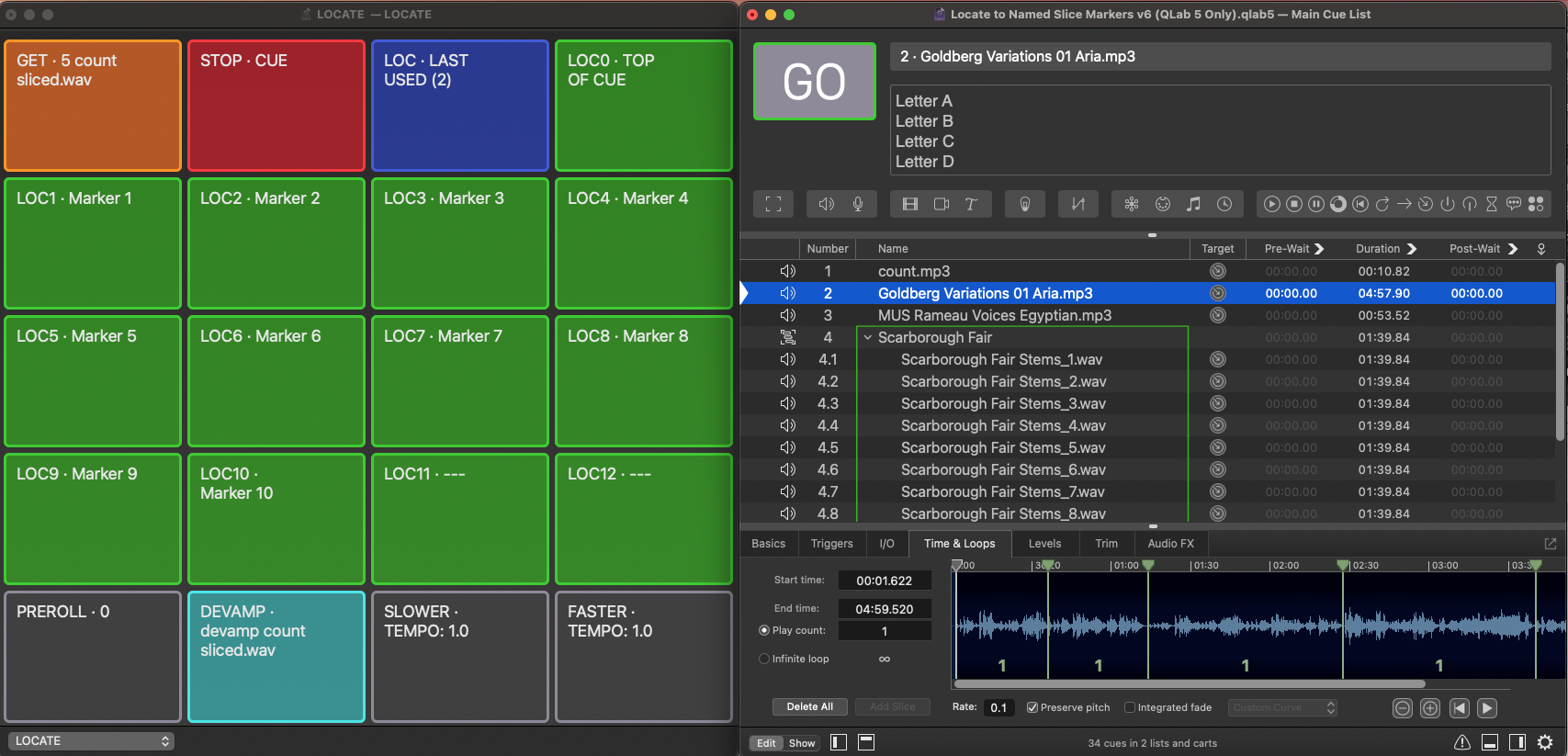
It uses QLab's slice markers to mark cue points, and extends their functionality by providing a means for them to be named using a list of names in the notes field of the Audio cue.
When you select a cue that contains these named markers, the cue is "loaded into" a cart. The "locate buttons" in the cart become labelled with the marker names, and pressing a button will commence playback immediately from the named location displayed on that button (with an optional pre-roll).
For stems in a Timeline Group Cue, the Group can be played from named locations based on the slices and notes of the first Audio cue in the Group.
The Workspace locates to timeline values relative to the start time of the cue, regardless of repeated slices, and can therefore locate beyond infinitely looped slices.
The cue rate setting can be changed between 0.1X and 2X speed in 0.1 increments to allow for rehearsals at slower (or faster) tempos.
In addition, location names can be imported directly from WAV files that contain named markers saved by a DAW or other audio editing application.
Here it is in action:
Here's the play-by-play:
All the programming is contained in the cart cues. This makes the cart fully portable, as it has no dependencies. It can just be copied from workspace to workspace.
We'll examine the functionality of each cart cue in turn.
This is a Script cue with the following script:
applescriptset theLast to 12 --number of last locator button in this cart
tell application id "com.figure53.QLab.5" to tell front workspace
  try
    set theselected to last item of (selected as list)
  on error
    my errorFlag(1)
  end try
  if the q type of theselected is in {"audio", "video"} then
    try
      set theSlices to slice markers of theselected
      set theLocators to (paragraphs of (get notes of theselected))
      set theName to q list name of theselected

    on error
      my errorFlag(2)
      return
    end try
  else if the q type of theselected is "group" then
    if the mode of theselected is not timeline then my errorFlag(10)
    try
      set theFirst to (first cue of theselected)
    on error
      my errorFlag(4)
    end try
    try
      set theSlices to slice markers of theFirst
      set theLocators to (paragraphs of (get notes of theFirst))
      set theName to q list name of theselected

    on error
      my errorFlag(3)
    end try
  else
    my errorFlag(7)
    return
  end if
  if the (count of theSlices) is not equal to the (count of theLocators) then my errorFlag(5)

  set the q name of cue "GET" to q number of theselected & " " & q list name of theselected
  set the cue target of cue "DEVAMP" to theselected
  set the notes of cue "SLOWER" to 1.1
  start cue "SLOWER"
  set the notes of cue "GET" to uniqueID of theselected
  if the q type of theselected is "group" then
    set the notes of cue "LOC0" to uniqueID of theFirst
  else
    set the notes of cue "LOC0" to uniqueID of theselected
  end if
  repeat with i from 1 to theLast
    set the q name of cue ("LOC" & (i as text)) to "--- "
  end repeat
  try
    repeat with i from 1 to count of theSlices
      set the q name of cue ("LOC" & (i as text)) to item i of theLocators
    end repeat
  end try
  try
    repeat with i from 1 to count of theSlices
      set locCue to cue ("LOC" & (i as text))
      set the q name of locCue to item i of theLocators
      set the notes of locCue to item i of theSlices
    end repeat
  end try
end tell

on errorFlag(errorNumber)
  if errorNumber = 1 then display alert "No cue Selected"
  if errorNumber = 2 then display alert "Cue selected is not an audio, video or group cue"
  if errorNumber = 3 then display alert "First cue in the selected group is not an audio or video cue "
  if errorNumber = 4 then display alert "Group is empty"
  if errorNumber = 5 then display alert " Slices and Locators do not match"
  if errorNumber = 7 then display alert "Cue Selected is not an audio, video, or group cue"
  if errorNumber = 8 then display alert "Notes field of selected cue does not contain any locator data"
  if errorNumber = 10 then display alert "Mode of group is not timeline "
  error number -128 --exit script
end errorFlag
The first thing you may notice with this script is the large amount of error-checking. There are many reasons the GET script could fail; they are listed in the on errorFlag block. Every time an error is encountered, one of these error conditions will be triggered, and the person using the workspace will get some information about what's wrong. Better that than to fail silently, leaving the person wondering what to do next.
The script begins by setting a variable to tell it how many locator buttons are in the cart.
The selected cue is assigned to a variable.
The selected cue is tested to make sure it is either a Video or Audio cue; if it is, then its slice markers are placed in a list variable, the location names (each one of which is a separate paragraph in the cue's notes field) in another list variable, and the name of the cue in a third variable.
If the selected cue is a Group cue, then the first cue in the Group is assigned to a variable so that its slices and names can be accessed when required.
We are going to need all these variables accessible after the GET script is run in order to make everything else in the cart work, so they need to be stored in places where they will persist until another cue is loaded with the GET cart cue.
The name of the cart cue numbered GET is set to the name of the selected cue, as is the cue target of the DEVAMP cart cue.
The rate is reset back to 1. The current rate is stored in the notes of the cart cue numbered SLOWER.
The cue id of the cue whose slice markers and location names are going to be used for the locating is stored in the notes of cue LOC0.
All the LOC cart cues have their names reset to –-– to indicate they are empty, then each of the locator cart cues is set up in turn using a repeat loop.
Each cart cue is named with the marker name it will locate to, and the slice tome for that marker is stored in its notes.
The whole cart is now set up to refer to the cue that was selected when the GET cue was last started, even if the selected cue changes. This will be the case until another cue is selected and the GET cue is started again. The whole cart has become a dedicated control panel for that one cue. In the following cue descriptions, this cue is referred to as the cue that is "on" the cart.
This is a Script cue with a short, simple script:
applescripttell application id "com.figure53.QLab.5" to tell front workspace
  try
    set theCue to cue id (notes of cue "GET")
    stop theCue
  end try
end tell
It uses the variable stored by the GET script to identify the cue on the cart and stop it.
This is a Devamp cue set to devamp the currently looping slice with no other options set.
It is set to target the cue on the cart by the GET script.
This is a Script cue with a short, simple script:
applescripttell application id "com.figure53.QLab.5" to tell front workspace
  try
    set thePreRoll to text returned of (display dialog "Set PreRoll time (Seconds) " default answer (q list name of cue "PREROLL" as text)) as real
  on error
    set the q name of cue "PREROLL" to 0
    return
  end try
  set the q name of cue "PREROLL" to thePreRoll
end tell
It sets its own name to the number of seconds returned from a dialog with the person using the workspace. The dialog supplies a default answer, which is the current pre-roll time. If the user doesn't type a number as a valid response, the script fails silently.
These are both Script cues. This is the SLOWER script:
applescripttell application id "com.figure53.QLab.5" to tell front workspace
  set theCue to (notes of cue "GET")
  set theRate to (notes of cue "SLOWER")
  if the notes of cue "SLOWER" > 0.1 then
    set the notes of cue "SLOWER" to theRate - 0.1
    set the q name of cue "SLOWER" to return & "TEMPO: " & ((notes of cue "SLOWER") * 10 as integer) / 10
    set the q name of cue "FASTER" to return & "TEMPO: " & ((notes of cue "SLOWER") * 10 as integer) / 10
    set theOSC to "/cue_id/" & (notes of cue "GET") & "/rate/live " & (get notes of cue "SLOWER" as text as real)
    do shell script "echo " & quoted form of theOSC & " | nc -u -w 0 127.0.0.1 53535"
  end if

  set theTempo to notes of cue "SLOWER" as text as real
  if theTempo < 1 then
    set the q color of cue "SLOWER" to "red"
    set the q color of cue "FASTER" to "none"
    set the q name of cue "SLOWER" to return & "TEMPO: " & ((notes of cue "SLOWER") * 10 as integer) / 10 & return & "<<<<<<<<<<"
    set the q name of cue "FASTER" to return & "TEMPO: " & ((notes of cue "SLOWER") * 10 as integer) / 10
  else if theTempo > 1 then
    set the q color of cue "SLOWER" to "none"
    set the q color of cue "FASTER" to "red"
    set the q name of cue "SLOWER" to return & "TEMPO: " & ((notes of cue "SLOWER") * 10 as integer) / 10
    set the q name of cue "FASTER" to return & "TEMPO: " & ((notes of cue "SLOWER") * 10 as integer) / 10 & return & ">>>>>>>>>>"

  else
    set the q color of cue "SLOWER" to "none"
    set the q color of cue "FASTER" to "none"
    set the q name of cue "SLOWER" to return & "TEMPO: " & ((notes of cue "SLOWER") * 10 as integer) / 10
    set the q name of cue "FASTER" to return & "TEMPO: " & ((notes of cue "SLOWER") * 10 as integer) / 10
    end if
  end tell
This is the FASTER script:
applescripttell application id "com.figure53.QLab.5" to tell front workspace
  set theCue to (notes of cue "GET")
  set theRate to (notes of cue "SLOWER")
  if the notes of cue "SLOWER" < 2 then
    set the notes of cue "SLOWER" to theRate + 0.1
    set the q name of cue "SLOWER" to return & "TEMPO: " & ((notes of cue "SLOWER") * 10 as integer) / 10
    set the q name of cue "FASTER" to return & "TEMPO: " & ((notes of cue "SLOWER") * 10 as integer) / 10
    set theOSC to "/cue_id/" & (notes of cue "GET") & "/rate/live " & (get notes of cue "SLOWER" as text as real)
    do shell script "echo " & quoted form of theOSC & " | nc -u -w 0 127.0.0.1 53535"
  end if
  set theTempo to notes of cue "SLOWER" as text as real
  if theTempo < 1 then
    set the q color of cue "SLOWER" to "red"
    set the q color of cue "FASTER" to "none"
    set the q name of cue "SLOWER" to return & "TEMPO: " & ((notes of cue "SLOWER") * 10 as integer) / 10 & return & "<<<<<<<<<<"
    set the q name of cue "FASTER" to return & "TEMPO: " & ((notes of cue "SLOWER") * 10 as integer) / 10
  else if theTempo > 1 then
    set the q color of cue "SLOWER" to "none"
    set the q color of cue "FASTER" to "red"
    set the q name of cue "SLOWER" to return & "TEMPO: " & ((notes of cue "SLOWER") * 10 as integer) / 10
    set the q name of cue "FASTER" to return & "TEMPO: " & ((notes of cue "SLOWER") * 10 as integer) / 10 & return & ">>>>>>>>>>"
  else
    set the q color of cue "SLOWER" to "none"
    set the q color of cue "FASTER" to "none"
    set the q name of cue "SLOWER" to return & "TEMPO: " & ((notes of cue "SLOWER") * 10 as integer) / 10
    set the q name of cue "FASTER" to return & "TEMPO: " & ((notes of cue "SLOWER") * 10 as integer) / 10
  end if
end tell
The notes of cue SLOWER hold the current rate setting. The notes were set back to 1 when the GET script was run.
When the SLOWER cue is started, the stored rate is decremented by 0.1. When the FASTER button is pressed, it is incremented by 0.1.
The names of both SLOWER and FASTER show the current tempo. If the rate is less than 1, the SLOWER cue turns red and displays a running arrows icon. If the rate is greater than 1, the FASTER cue turns red and displays the arrows.
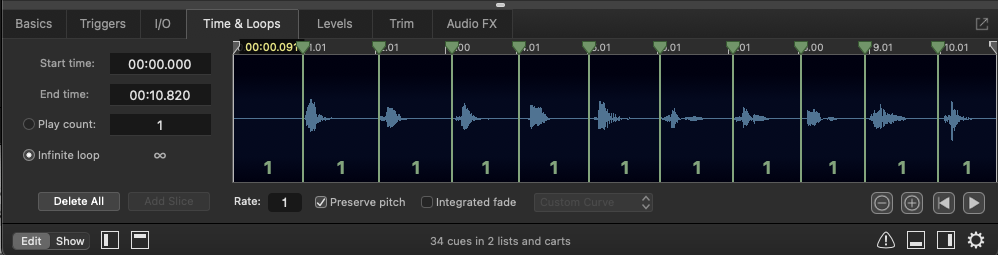
Generally, you'll want to set all Audio and Video cues to preserve pitch in the Time & Loops tab of the inspector. That way, tempo changes don't also change the pitch of the audio.
This is a Script cue with the following script:
applescripttell application id "com.figure53.QLab.5" to tell front workspace
  try
    set theCue to cue id (notes of cue "GET")
    stop theCue
    delay 0.1
    start theCue
    set theOSC to "/cue_id/" & (notes of cue "GET") & "/rate/live " & (get notes of cue "SLOWER" as text as real)
    do shell script "echo " & quoted form of theOSC & " | nc -u -w 0 127.0.0.1 53535"
  end try
end tell
This script stops the cue on the cart and plays it from the beginning at the current rate stored in the notes of cue SLOWER.
This uses the live rate, so that when the cue is played normally in the cue list, it will play at the correct speed; the rate only affects the cue on the cart.
QLab's AppleScript dictionary does not contain the live rate command needed, but the OSC dictionary does. In this and similar cases, the solution is to format an OSC command and to send it as plain text to port 53535 using a shell script. Some important points need to be observed.
First, QLab uses localhost as an internal loopback address. As this OSC must go outside QLab to be routed through the terminal, the IP address must be 127.0.0.1, not localhost.
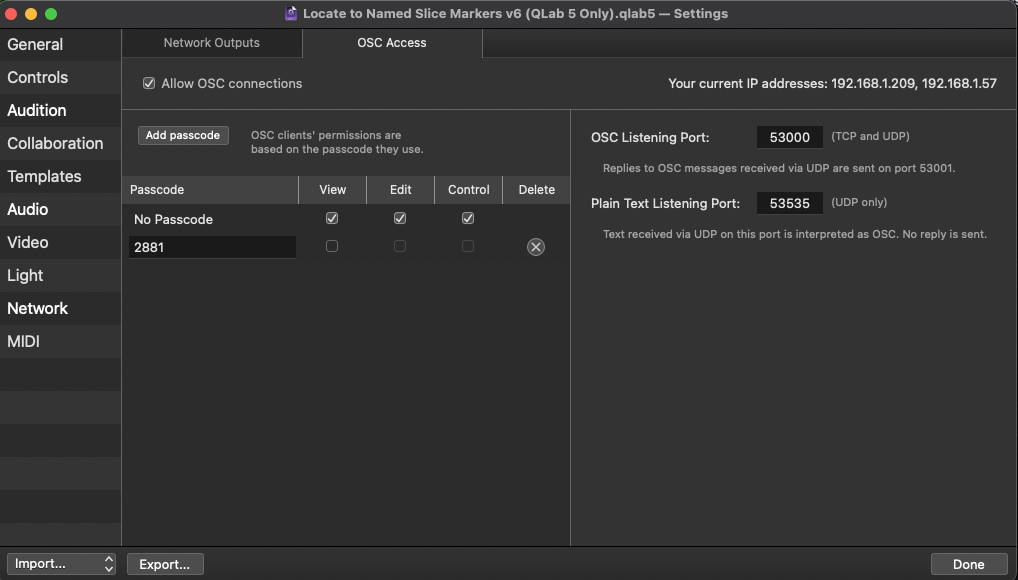
Second, the "no passcode" entry for OSC access must be given edit permission in Workspace Settings → Network → OSC Access.
The rest of the cart cues locate to the relevant named marker and start playback.
These are Script cues which all have a very similar, brief script:
applescriptset myLOC to 1 -- 1 to 12 depending on the cue
---------------------------
tell application id "com.figure53.QLab.5" to tell front workspace
  set notes of cue "LOC" to myLOC
  start cue "LOC"
end tell
The cues simply identify themselves when started by setting the notes of cue LOC to their identifying number, and then start cue LOC which contains the actual locator script.
The first advantage of doing it this way is that the locator script can be adjusted quickly. Otherwise, every time you wanted to change the way locating works, you'd need to edit all 12 locate cues.
The second advantage is that it can easily scale. If 92 locator cues were required, it would only be necessary to:
set myLOC to 92You could even use a script to generate the cart cues:
applescriptset theButtonQuantity to 92 --number of cart cues to make
tell application id "com.figure53.QLab.5" to tell front workspace
  repeat with x from 1 to theButtonQuantity
    make type "script"
    set theButton to last item of (selected as list)
    set the q number of theButton to "LOC" & x
    set the q name of theButton to "--"
    set the script source of theButton to "set myLOC to " & x & return & "tell application id \"com.figure53.QLab.5\" to tell front workspace" & return & "set notes of cue \"LOC\" to myLOC" & return & "start cue \"LOC\"" & return & "end tell"
    set the q color of theButton to "green"
  end repeat
end tell
The cart cue numbered LOC holds the main locator script and also functions as a repeat button to play the previous location again.
applescripttell application id "com.figure53.QLab.5" to tell front workspace
  set thePreRoll to q list name of cue "PREROLL" as real
  set theCue to cue id (notes of cue "GET")
  set theMarkerRef to cue id (notes of cue "LOC0")
  set myLOC to notes of cue "LOC"
  set q name of cue "LOC" to "LAST USED (" & myLOC & ")"
  stop theCue
  delay 0.1
  set theSlices to slice markers of theMarkerRef
  set theTime to (time of item myLOC of theSlices) - thePreRoll - the (start time of theMarkerRef)
  if theTime < 0 then set theTime to 0
  set theOSC to "/cue_id/" & (notes of cue "LOC0") & "/loadFileAt " & theTime
  do shell script "echo " & quoted form of theOSC & " | nc -u -w 0 127.0.0.1 53535"
  if the q type of theCue is "group" then load theCue time (action elapsed of theMarkerRef)
  delay 0.1
  set theOSC to "/cue_id/" & (notes of cue "LOC0") & "/rate/live " & (get notes of cue "SLOWER" as text as real)
  do shell script "echo " & quoted form of theOSC & " | nc -u -w 0 127.0.0.1 53535"
  start theCue
end tell
The script reads in the values for pre-roll, the cue on the cart, the cue containing the marker names and slices (either the same as the cue on the cart, or the first child cue if the cue on the cart is a Group cue), and the name of the locator cue that started the cue LOC.
It sets its name to the name of the locator button, to indicate the last Location point.
It finds the slice time corresponding to LOC1-12, e.g. if LOC6 started cue LOC, then the slice time is item 6 of the list of slice times.
It sets the live rate of the cue on the cart to the current playback rate using the OSC method previously discussed.
Then it starts the cue on the cart.
Manually adding slices and marker names to cues is reasonably quick, and will work with any file target type. If your project uses a large number of WAV files, and those WAV files contain markers added in a DAW or audio editor, it may be worthwhile to automate the import of marker names to the notes field of the audio cues.
This method uses a free command line tool called ExifTool which was created by Phil Harvey.
ExifTool is a platform-independent Perl library plus a command line application for reading, writing, and editing metadata in a wide variety of media files of all types. It's very powerful and very complicated. To read marker names from the metadata of a WAV file, ExifTool uses a config file called cuepointlist.config.
Command line tools are sometimes fiddly to install and get working. Before embarking on an installation, consider whether you really will save a lot of time by using this method. Of course if you're sufficiently curious to see how it works, then the practical time savings may be irrelevant to you. Having said that, a test of these installation instructions on two separate computers got the basics working in about five minutes. Your experience level with the Terminal, the version of macOS that your computer is using, and possibly other software installed on your Mac might all have an effect on the amount of time that this takes.
Download the ExifTool installer here and double-click on the download to install the program.
Download cuepointlist.config from the download link on this page.
It needs to be put in the folder /usr/local/bin, which you can quickly locate by choosing Go to Folder... from the Go menu in the Finder.
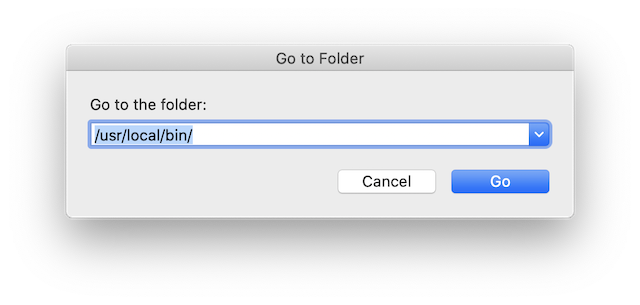
This is the same folder in which ExifTool was installed automatically.
Once it's installed, you can use this script, triggered from a hotkey, which will attempt to fetch marker names from selected cues' targeted WAV files.
applescripttell application id "com.figure53.QLab.5" to tell front workspace
  set theCues to (selected as list)
  repeat with eachCue in theCues
    if the q type of eachCue is not "audio" then
      display alert "Cue " & (q number of eachCue) & " is not an audio cue"
      return
    end if
    set theFile to (file target of eachCue) as alias
    tell application "Finder" to set theType to name extension of theFile
    if theType is not "<abbr>WAV</abbr>" then
      display alert "Cue " & (q number of eachCue) & " is not a <abbr>WAV</abbr>"
      return
    end if
    if notes of eachCue is "" then
      set theFile to quoted form of POSIX path of (file target of eachCue as alias)
      set ExifTool to "/usr/local/bin/exiftool "
      set theData to (do shell script ExifTool & " -config cuepointlist.config -cuepointlist -b " & theFile) as text
      set theMarkerNames to ""
      repeat with thePara from 2 to (count of paragraphs of theData)
        repeat with theWord from 4 to count of words of paragraph thePara of theData
          set theMarkerNames to theMarkerNames & (word theWord of paragraph thePara of theData)
          if theWord is not (count of words of paragraph thePara of theData) then set theMarkerNames to theMarkerNames & " "
        end repeat
        if thePara is not (count of paragraphs of theData) then set theMarkerNames to theMarkerNames & return
      end repeat
      set notes of eachCue to theMarkerNames
    else
      display alert "Cue " & (q number of eachCue) & " was not edited as its notes field contained notes which you might not want to overwrite, or existing marker names which may have been edited." & return & return & "To import the original marker names from the audio file, delete all notes in this cue"
      set the flagged of eachCue to true
    end if
  end repeat
end tell
To protect cues you have edited manually, or cues which have been previously imported but may have had extra slice markers and names added, or cues that have had the slice markers moved about, only cues that have empty notes fields will be considered by the script. The script also checks that the selected cues' file targets are WAV files. Any selected cues whosenotes fields are not empty or whose file targets are not WAV files will generate an alert message in the script. The script also flags the offending cue to make it easy for you to review the situation.
Goldberg Variations by JS Bach Public Domain. The Open Goldberg Variations is a project by pianist Kimiko Ishizaka, and MuseScore.com, to create a public domain recording and score of J.S. Bach's masterpiece, Die Goldberg Variationen (BWV 988).
Other music arranged and recorded by Mic Pool ©2023, all rights reserved.
ExifTool and its config file are freeware created by Phil Harvey.
Chapter image © Raimond Spekking / CC BY-SA 4.0 (via Wikimedia Commons).
